Common Craft have just released a "Plain English" Google Reader video.
I have 106 Google Reader feeds - 55 are student journals. Journal posts for the SDI class now total 370 - easily managed with the magic of RSS.
While on stat's... Twitter posts for the SDI class have just passed 1,000 - that's a lot of activity in just one course.
I've just printed all this and it's 6cm of A4 pages - and mostly double sided printing! Thankfully I can print directly to high speed photocopiers. And every page was where I could find it - one click to open, one click to print :-)
.
Showing posts with label ICT_tools. Show all posts
Showing posts with label ICT_tools. Show all posts
Thursday, August 28, 2008

Wednesday, April 30, 2008
Presentations, Concepts and Questions
 The Glassbiscuit Development Team set a very high standard when they gave the first project presentation for the year. It was informative and well structured with clear visuals. (I'll edit this post when I can link to some of their content.) Thanks to Zoe on video and camera we will soon be able to see some of the action - and review it for future presentations.
This week we looked at concept mapping - using Cmap - an excellent tool that is easy to use and enables you to share maps online. This map shows where the tool might be used in the SDI course. Boxes in the map can contain a range of resources - such as web links.
One of the resources attached to the above 'Key Questions' box is a very useful Questioning Toolkit. Asking questions is a key part of SDI project work and research.
 In other news... many excellent projects are well underway now with some high quality prototypes and products beginning to appear. Even though most projects have a long way to go you can get some sense of the range of work being done by looking at the slide show on the top-right of this page (and here) and the journals further down the right-hand column.
In particular checkout the recent work in Enigmarta Productions, Buggs Blog and Project CLOUT,
Tuesday, April 8, 2008
Top Tools for Learning
We're in the top 10!
OK it doesn't mean that much but it's interesting to see that many of the learning tools we are using in this course have been rated highly in a survey of 155 educators by the Centre for Learning Performance Technologies.
We use seven of the top 20 tools: del.icio.us, Firefox, Google Reader, Gmail, Blogger, Moodle and twitter.
Wikis also feature in the top 20 and this tool was chosen by seven members of the Glassbiscuit Development Unit.
Also of note is that in the top 100 tools Facebook now comes in at 28 and Second Life has risen dramatically since last year to be number 41.
Google Earth comes in at 48 and this is certainly reflected at HC where many classes used it in 2008.
OK it doesn't mean that much but it's interesting to see that many of the learning tools we are using in this course have been rated highly in a survey of 155 educators by the Centre for Learning Performance Technologies.
We use seven of the top 20 tools: del.icio.us, Firefox, Google Reader, Gmail, Blogger, Moodle and twitter.
Wikis also feature in the top 20 and this tool was chosen by seven members of the Glassbiscuit Development Unit.
Also of note is that in the top 100 tools Facebook now comes in at 28 and Second Life has risen dramatically since last year to be number 41.
Google Earth comes in at 48 and this is certainly reflected at HC where many classes used it in 2008.
Sunday, March 30, 2008
Assessment AS Learning

Student-Directed Inquiry emphasizes assessment AS learning rather than the more traditional assessment OF learning where testing of what you know is often carried out at the end of units, topics or the year...
Essentially assessment AS learning supports student management of their own assessment - incorporating assessment FOR learning and even some assessment OF learning as required. It is about SELF assessment.
This course has FOUR criteria or ‘dimensions’ of learning. For each criterion we are looking for documented evidence of a range of ‘elements’. See presentation.
Learning and research tools can provide ways to capture, edit, organise and share work.
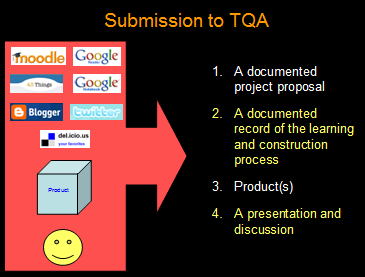 Regular use of these tools can help to improve the efficiency and quality of the documentation process required by the qualifications authority. These same tools also enable students to:
- participate in learning communities
- engage in accountable communication
- manage learning and assessment
- organise, authenticate and reference research
Wednesday, March 5, 2008
Mimio Handles Complex Game Plan

The Glassbiscuit team moved their planning to the whiteboard today - recording their ideas to a laptop using Dirk's favourite device - the Mimio :-) This team of six certainly needed the space - not just because they are a large production team but because their project is large and complex.

 For documentation, collaboration and file sharing they have chosen to customise the free hosted Wikidot. It's well organised and has RSS feeds for easy feeds - once they adjust the security setting so we can access it :-)
A critical issue with such a large project team is the ability of each team member to be able to document both their individual and collaborative work. This is required for assessment at the highest level of the Student-Directed Inquiry course.
The level of organisation and documentation that the team has put in place should address this very well.
Another aspect of the group's planning involves P.H.A.S.E.
According to their FAQ:
"P.H.A.S.E. (Project HAndling System Environment), is a scheduling system designed (soon) to set deadlines for the completion of all aspects of the project. Once a "phase" is complete a new playable version of the game will also be completed, meaning that we will not be left with a bunch of incoherent stuff at the end of the year, but a finished project and a graphic representation of the path we took to create it."
Sounds like a great idea!
Sunday, February 24, 2008
Birds Eye Views
Sometimes the best laid plans... WORK!
Although some students have been a little frustrated with the first week of classes with multiple registrations/passwords/emails... it's starting to come together - well for me at least :-)
With all students in Gmail I can see who is online, hover over names and see faces, initiate chat, organise groups... Great for matching names and faces for the 50 new students I have...

With all students in Twitter I get an over-view of class activity - and easily click to read individual 'activity logs'. This will also enable me to gauge participation and levels of engagement.

With all students in Moodle I can see who has accessed tasks, viewed resources and submitted assignments... and MUCH more.

With all students in 43Things RSS'ed to Google Reader I can keep track of each person's learning goals and targets...

Now that these are set up I can sit back and relax while online services and RSS do all the work... OK maybe not... but at least I can now realistically work on the personalised learning and teaching while the ICTs look after the data management side of things.
Although some students have been a little frustrated with the first week of classes with multiple registrations/passwords/emails... it's starting to come together - well for me at least :-)
With all students in Gmail I can see who is online, hover over names and see faces, initiate chat, organise groups... Great for matching names and faces for the 50 new students I have...

With all students in Twitter I get an over-view of class activity - and easily click to read individual 'activity logs'. This will also enable me to gauge participation and levels of engagement.

With all students in Moodle I can see who has accessed tasks, viewed resources and submitted assignments... and MUCH more.

With all students in 43Things RSS'ed to Google Reader I can keep track of each person's learning goals and targets...

Now that these are set up I can sit back and relax while online services and RSS do all the work... OK maybe not... but at least I can now realistically work on the personalised learning and teaching while the ICTs look after the data management side of things.
Subscribe to:
Posts (Atom)

